
On this article we are going to do a silent install of Oracle Enterprise Manager Clod Control 24ai on a Oracle Linux 8 server.
First we need an oracle DB where the repository will run. You can use a non-cdb, but since starting from 26ai, CBD/PDB is a must, we are going to use a 19c PDB.
So lets first install RDBMS software and create a db.
We are going to start with an Oracle Linux server with a few installs:
[root@olinux8oem ~]# dnf -y install oracle-database-preinstall-19c
[root@olinux8oem ~]# yum install policycoreutils-python-utils
[root@olinux8oem ~]# dnf install perl
[root@olinux8oem ~]# yum install chkconfig
[root@olinux8oem ~]# yum update -y

[root@olinux8oem ~]# reboot
[root@olinux8oem ~]# uname -a
Linux olinux8oem 5.15.0-317.197.5.1.el8uek.x86_64 #2 SMP Fri Feb 13 02:40:51 PST 2026 x86_64 x86_64 x86_64 GNU/Linux
[root@olinux8oem ~]#
Install 19c RDBMS software and apply latest patch. (for now will work with 19.26 Patch… so not the latest.)
[oracle@olinux8oem ~]$ cd /u01/app/oracle/product/19c/db_home1/
[oracle@olinux8oem db_home1]$ cp -p /u01/installs/LINUX.X64_193000_db_home.zip .
[oracle@olinux8oem db_home1]$ unzip -q LINUX.X64_193000_db_home.zip
[oracle@olinux8oem db_home1]$ rm -rf OPatch/
[oracle@olinux8oem db_home1]$ cp -p /u01/installs/19.26_OPATCH_p6880880_190000_Linux-x86-64.zip .
[oracle@olinux8oem db_home1]$ unzip -q 19.26_OPATCH_p6880880_190000_Linux-x86-64.zip
[oracle@olinux8oem db_home1]$ rm *zip

[oracle@olinux8oem db_home1]$ ./OPatch/opatch version
OPatch Version: 12.2.0.1.46


Response file used:

[oracle@olinux8oem ~]$ cat /u01/app/oracle/product/19c/db_home1/install/response/SW_install.rsp
oracle.install.responseFileVersion=/oracle/install/rspfmt_dbinstall_response_schema_v19.0.0
oracle.install.option=INSTALL_DB_SWONLY
UNIX_GROUP_NAME=oinstall
INVENTORY_LOCATION=/u01/app/oraInventory
ORACLE_BASE=/u01/app/oracle
oracle.install.db.InstallEdition=EE
oracle.install.db.OSDBA_GROUP=oinstall
oracle.install.db.OSOPER_GROUP=oper
oracle.install.db.OSBACKUPDBA_GROUP=backupdba
oracle.install.db.OSDGDBA_GROUP=dgdba
oracle.install.db.OSKMDBA_GROUP=kmdba
oracle.install.db.OSRACDBA_GROUP=racdba
oracle.install.db.rootconfig.executeRootScript=false
oracle.install.db.rootconfig.configMethod=
oracle.install.db.rootconfig.sudoPath=
oracle.install.db.rootconfig.sudoUserName=
oracle.install.db.CLUSTER_NODES=
oracle.install.db.config.starterdb.type=GENERAL_PURPOSE
oracle.install.db.config.starterdb.globalDBName=
oracle.install.db.config.starterdb.SID=
oracle.install.db.ConfigureAsContainerDB=false
oracle.install.db.config.PDBName=
oracle.install.db.config.starterdb.characterSet=
oracle.install.db.config.starterdb.memoryOption=false
oracle.install.db.config.starterdb.memoryLimit=
oracle.install.db.config.starterdb.installExampleSchemas=false
oracle.install.db.config.starterdb.password.ALL=
oracle.install.db.config.starterdb.password.SYS=
oracle.install.db.config.starterdb.password.SYSTEM=
oracle.install.db.config.starterdb.password.DBSNMP=
oracle.install.db.config.starterdb.password.PDBADMIN=
oracle.install.db.config.starterdb.managementOption=DEFAULT
oracle.install.db.config.starterdb.omsHost=
oracle.install.db.config.starterdb.omsPort=0
oracle.install.db.config.starterdb.emAdminUser=
oracle.install.db.config.starterdb.emAdminPassword=
oracle.install.db.config.starterdb.enableRecovery=false
oracle.install.db.config.starterdb.storageType=
oracle.install.db.config.starterdb.fileSystemStorage.dataLocation=
oracle.install.db.config.starterdb.fileSystemStorage.recoveryLocation=
oracle.install.db.config.asm.diskGroup=
oracle.install.db.config.asm.ASMSNMPPassword=
[oracle@olinux8oem ~]$


Run Installer in silent mode:

[oracle@olinux8oem ~]$ export CV_ASSUME_DISTID=OEL7.8
[oracle@olinux8oem ~]$ /u01/app/oracle/product/19c/db_home1/runInstaller -silent -responsefile /u01/app/oracle/product/19c/db_home1/install/response/SW_install.rsp -waitforcompletion -ignorePrereqFailure
Launching Oracle Database Setup Wizard...

The response file for this session can be found at:
 /u01/app/oracle/product/19c/db_home1/install/response/db_2026-02-22_05-38-59PM.rsp

You can find the log of this install session at:
 /tmp/InstallActions2026-02-22_05-38-59PM/installActions2026-02-22_05-38-59PM.log

As a root user, execute the following script(s):
        1. /u01/app/oraInventory/orainstRoot.sh
        2. /u01/app/oracle/product/19c/db_home1/root.sh

Execute /u01/app/oraInventory/orainstRoot.sh on the following nodes:
[olinux8oem]
Execute /u01/app/oracle/product/19c/db_home1/root.sh on the following nodes:
[olinux8oem]


Successfully Setup Software.
Moved the install session logs to:
 /u01/app/oraInventory/logs/InstallActions2026-02-22_05-38-59PM
[oracle@olinux8oem ~]$


ROOT SCRIPTS:

[root@olinux8oem ~]# /u01/app/oraInventory/orainstRoot.sh
Changing permissions of /u01/app/oraInventory.
Adding read,write permissions for group.
Removing read,write,execute permissions for world.

Changing groupname of /u01/app/oraInventory to oinstall.
The execution of the script is complete.

[root@olinux8oem ~]# /u01/app/oracle/product/19c/db_home1/root.sh
Check /u01/app/oracle/product/19c/db_home1/install/root_olinux8oem_2026-02-22_17-44-53-044167500.log for the output of root script
[root@olinux8oem ~]#
19.26 Patch applied:
[oracle@olinux8oem ~]$ $ORACLE_HOME/OPatch/opatch lspatches
37268031;OCW RELEASE UPDATE 19.26.0.0.0 (37268031)
37102264;OJVM RELEASE UPDATE: 19.26.0.0.250121 (37102264)
37260974;Database Release Update : 19.26.0.0.250121 (37260974)
OPatch succeeded.
[oracle@olinux8oem ~]$
Create DB:
[oracle@olinux8oem ~]$ cd /u01/app/oracle/product/19c/db_home1/bin
[oracle@olinux8oem ~]$ ./dbca \
     -ignorePreReqs \
     -ignorePrereqFailure \
     -silent \
     -createDatabase \
     -templateName General_Purpose.dbc \
     -sid oemdb \
     -gdbName oemdb \
     -SysPassword syspassword \
     -SystemPassword systempassword \
     -storageType FS \
     -datafileDestination /u01/app/oracle/datafiles \
	 -archiveLogDest /u01/app/oracle/flashback \
	 -enableArchive true  \
	 -redoLogFileSize 100 \
	 -createAsContainerDatabase true \
	 -numberOfPDBs 1 \
	 -pdbAdminPassword pdbadmin \
     -pdbName oempdbrep \
     -initParams db_unique_name=oemdb,sga_max_size=1500M,sga_target=1500M,pga_aggregate_target=200M
....
100% complete
Database creation complete. For details check the logfiles at:
 /u01/app/oracle/cfgtoollogs/dbca/oemdb.
Database Information:
Global Database Name:oemdb
System Identifier(SID):oemdb
Look at the log file "/u01/app/oracle/cfgtoollogs/dbca/oemdb/oemdb.log" for further details.
[oracle@olinux8oem bin]$
Cloud Control 24ai Silent Installation:
Unzip software:

[oracle@olinux8oem ~]$ ls -tlr /u01/installs/OEM
total 8229540
-rwxrwx---. 1 oracle oinstall 1532547469 Feb 20 20:17 V1046952-01.zip
-rwxrwx---. 1 oracle oinstall 1679195404 Feb 20 20:18 V1046954-01.zip
-rwxrwx---. 1 oracle oinstall 1669545916 Feb 20 20:18 V1046955-01.zip
-rwxrwx---. 1 oracle oinstall 1921746284 Feb 20 20:19 V1046953-01.zip
-rwxrwx---. 1 oracle oinstall 1624006261 Feb 20 20:19 V1046951-01.zip
[oracle@olinux8oem ~]$
[oracle@olinux8oem ~]$ cd /u01/installs/OEM
[oracle@olinux8oem OEM]$ unzip -q V1046951-01.zip
[oracle@olinux8oem OEM]$ unzip -q V1046952-01.zip
[oracle@olinux8oem OEM]$ unzip -q V1046953-01.zip
[oracle@olinux8oem OEM]$ unzip -q V1046954-01.zip
[oracle@olinux8oem OEM]$ unzip -q V1046955-01.zip
[oracle@olinux8oem OEM]$ ls -tlr
total 16459392
-r--r--r--. 1 oracle oinstall 1532547277 Dec  5  2024 em24100_linux64-2.zip
-r--r--r--. 1 oracle oinstall 1921746092 Dec  5  2024 em24100_linux64-3.zip
-r--r--r--. 1 oracle oinstall 1679195212 Dec  5  2024 em24100_linux64-4.zip
-r--r--r--. 1 oracle oinstall 1669545724 Dec  5  2024 em24100_linux64-5.zip
-r-xr-xr-x. 1 oracle oinstall 1624325096 Dec  5  2024 em24100_linux64.bin
-rwxrwx---. 1 oracle oinstall 1532547469 Feb 20 20:17 V1046952-01.zip
-rwxrwx---. 1 oracle oinstall 1679195404 Feb 20 20:18 V1046954-01.zip
-rwxrwx---. 1 oracle oinstall 1669545916 Feb 20 20:18 V1046955-01.zip
-rwxrwx---. 1 oracle oinstall 1921746284 Feb 20 20:19 V1046953-01.zip
-rwxrwx---. 1 oracle oinstall 1624006261 Feb 20 20:19 V1046951-01.zip
[oracle@olinux8oem OEM]$
Create few directories:
[oracle@olinux8oem ~]$ mkdir -p /u01/app/oracle/middleware
[oracle@olinux8oem ~]$ mkdir -p /u01/app/oracle/agent
[oracle@olinux8oem ~]$ mkdir -p /u01/app/oracle/gc_inst
[oracle@olinux8oem ~]$ mkdir -p /u01/app/oracle/swlib
Create response file:
[oracle@olinux8oem ~]$ cat /tmp/OEMinstall.rsp
RESPONSEFILE_VERSION=2.2.1.0.0
UNIX_GROUP_NAME=oinstall
INVENTORY_LOCATION=/u01/app/oraInventory
SECURITY_UPDATES_VIA_MYORACLESUPPORT=false
DECLINE_SECURITY_UPDATES=true
INSTALL_UPDATES_SELECTION=skip
ORACLE_MIDDLEWARE_HOME_LOCATION=/u01/app/oracle/middleware
ORACLE_HOSTNAME=olinux8oem
AGENT_BASE_DIR=/u01/app/oracle/agent
WLS_ADMIN_SERVER_USERNAME=weblogic
WLS_ADMIN_SERVER_PASSWORD=SuperS3cretPassword
WLS_ADMIN_SERVER_CONFIRM_PASSWORD=SuperS3cretPassword
NODE_MANAGER_PASSWORD=SuperS3cretPassword
NODE_MANAGER_CONFIRM_PASSWORD=SuperS3cretPassword
ORACLE_INSTANCE_HOME_LOCATION=/u01/app/oracle/gc_inst
CONFIGURE_ORACLE_SOFTWARE_LIBRARY=true
SOFTWARE_LIBRARY_LOCATION=/u01/app/oracle/swlib
DATABASE_HOSTNAME=localhost
LISTENER_PORT=1521
SERVICENAME_OR_SID=oempdbrep
SYS_PASSWORD=syspassword
SYSMAN_PASSWORD=SuperS3cretPassword
SYSMAN_CONFIRM_PASSWORD=SuperS3cretPassword
DEPLOYMENT_SIZE=SMALL
AGENT_REGISTRATION_PASSWORD=SuperS3cretPassword
AGENT_REGISTRATION_CONFIRM_PASSWORD=SuperS3cretPassword
PLUGIN_SELECTION={}
b_upgrade=false
EM_INSTALL_TYPE=NOSEED
CONFIGURATION_TYPE=LATER
CONFIGURE_SHARED_LOCATION_BIP=false
MANAGEMENT_TABLESPACE_LOCATION=/u01/app/oracle/datafiles/OEMDB/oempdbrep/mgmt.dbf
CONFIGURATION_DATA_TABLESPACE_LOCATION=/u01/app/oracle/datafiles/OEMDB/oempdbrep/mgmt_ecm_depot1.dbf
JVM_DIAGNOSTICS_TABLESPACE_LOCATION=/u01/app/oracle/datafiles/OEMDB/oempdbrep/mgmt_deepdive.dbf
[oracle@olinux8oem ~]$
Start silent software-only installation:
[oracle@olinux8oem ~]$ unset CLASSPATH
[oracle@olinux8oem ~]$ /u01/installs/OEM/em24100_linux64.bin -silent -responseFile /tmp/OEMinstall.rsp
....
....
....
Stack Patches got applied Successfully.
.Prompt for the allroot.sh

Warning: You must run the following configuration scripts as the "root" user.
  /u01/app/oracle/middleware/oms_home/allroot.sh
To execute the configuration scripts:
 1. Open a new  terminal window.
 2. Login in as "root".
 3. Run the scripts.

Successfully installed Enterprise Manager Cloud Control.
Logs successfully copied to /u01/app/oraInventory/logs.
[oracle@olinux8oem ~]$
ROOT script:
[root@olinux8oem ~]# /u01/app/oracle/middleware/oms_home/allroot.sh

Starting to execute allroot.sh .........

Starting to execute /u01/app/oracle/middleware/oms_home/root.sh ......
Check /u01/app/oracle/middleware/oms_home/install/root_olinux8oem_2026-02-24_17-09-52-723637771.log for the output of root script

Finished product-specific root actions.
/etc exist
/u01/app/oracle/agent/agent_24.1.0.0.0
Finished execution of  /u01/app/oracle/middleware/oms_home/root.sh ......

Starting to execute /u01/app/oracle/agent/agent_24.1.0.0.0/root.sh ......

Finished product-specific root actions.
/etc exist
/u01/app/oracle/agent/agent_24.1.0.0.0
Finished execution of  /u01/app/oracle/agent/agent_24.1.0.0.0/root.sh ......
[root@olinux8oem ~]#
Create response file to configure Cloud Control (it is almost the same than the previous response file):
[oracle@olinux8oem ~]$ cat /tmp/CloudControlinstall.rsp
RESPONSEFILE_VERSION=2.2.1.0.0
UNIX_GROUP_NAME=oinstall
INVENTORY_LOCATION=/u01/app/oraInventory
SECURITY_UPDATES_VIA_MYORACLESUPPORT=false
DECLINE_SECURITY_UPDATES=true
INSTALL_UPDATES_SELECTION=skip
ORACLE_MIDDLEWARE_HOME_LOCATION=/u01/app/oracle/middleware
ORACLE_HOSTNAME=olinux8oem
AGENT_BASE_DIR=/u01/app/oracle/agent
WLS_ADMIN_SERVER_USERNAME=weblogic
WLS_ADMIN_SERVER_PASSWORD=SuperS3cretPassword
WLS_ADMIN_SERVER_CONFIRM_PASSWORD=SuperS3cretPassword
NODE_MANAGER_PASSWORD=SuperS3cretPassword
NODE_MANAGER_CONFIRM_PASSWORD=SuperS3cretPassword
ORACLE_INSTANCE_HOME_LOCATION=/u01/app/oracle/gc_inst
CONFIGURE_ORACLE_SOFTWARE_LIBRARY=true
SOFTWARE_LIBRARY_LOCATION=/u01/app/oracle/swlib
DATABASE_HOSTNAME=localhost
LISTENER_PORT=1521
SERVICENAME_OR_SID=oempdbrep
SYS_PASSWORD=syspassword
SYSMAN_PASSWORD=SuperS3cretPassword
SYSMAN_CONFIRM_PASSWORD=SuperS3cretPassword
DEPLOYMENT_SIZE=SMALL
AGENT_REGISTRATION_PASSWORD=SuperS3cretPassword
AGENT_REGISTRATION_CONFIRM_PASSWORD=SuperS3cretPassword
PLUGIN_SELECTION={}
b_upgrade=false
EM_INSTALL_TYPE=NOSEED
CONFIGURATION_TYPE=ADVANCED
CONFIGURE_SHARED_LOCATION_BIP=false
MANAGEMENT_TABLESPACE_LOCATION=/u01/app/oracle/datafiles/OEMDB/oempdbrep/mgmt.dbf
CONFIGURATION_DATA_TABLESPACE_LOCATION=/u01/app/oracle/datafiles/OEMDB/oempdbrep/mgmt_ecm_depot1.dbf
JVM_DIAGNOSTICS_TABLESPACE_LOCATION=/u01/app/oracle/datafiles/OEMDB/oempdbrep/mgmt_deepdive.dbf
[oracle@olinux8oem ~]$
Now… before running the config, change this on the DB if not you will receive warning/fails:
Mandatory settings (Confugure fails..)
alter system set "_allow_insert_with_update_check"=true scope=both;

Suggested (you get WARNING's)
SQL> alter system set pga_aggregate_target=1G scope=spfile;
SQL> alter system set session_cached_cursors=200 scope=spfile;
SQL> alter system set processes=600 scope=spfile;
SQL> alter system set sga_target=3G scope=spfile;
SQL> alter system set shared_pool_size=600M scope=spfile;
Start the configuration in silent mode (this ran for me 5-6hours on a VirtualBox VM…):
[oracle@olinux8oem ~]$ unset CLASSPATH
[oracle@olinux8oem ~]$ unset TNS_ADMIN
[oracle@olinux8oem ~]$ export ORACLE_HOME=/u01/app/oracle/middleware/oms_home
[oracle@olinux8oem ~]$ export PATH=$ORACLE_HOME/bin:$PATH

[oracle@olinux8oem ~]$ /u01/app/oracle/middleware/oms_home/sysman/install/ConfigureGC.sh -silent -responseFile /tmp/CloudControlinstall.rsp
........
........
........
Cloning of agent home completed successfully
Agent Configuration completed successfully
The following configuration scripts need to be executed as the "root" user. Root script to run : /u01/app/oracle/agent/agent_24.1.0.0.0/root.sh
AgentConfiguration:agent configuration finished with status = true

2026-02-25_05-18-12PM: Configuration Assistant "Agent Configuration Assistant" has Succeeded.

*** The Installation was Successful. ***


This information is also available at:

        /u01/app/oracle/middleware/oms_home//install/setupinfo.txt

See the following for information pertaining to your Enterprise Manager installation:


Use the following URL to access:

        1. Enterprise Manager Cloud Control URL: https://olinux8oem:7803/em
        2. Admin Server URL: https://olinux8oem:7102/console

The following details need to be provided while installing an additional OMS:

        1. Admin Server Host Name: olinux8oem
        2. Admin Server Port: 7102

You can find the details on ports used by this deployment at : /u01/app/oracle/middleware/oms_home/install/portlist.ini


 NOTE:
 An encryption key has been generated to encrypt sensitive data in the Management Repository. If this key is lost, all encrypted data in the Repository becomes unusable.

 A backup of the OMS configuration is available in /u01/app/oracle/gc_inst/em/EMGC_OMS1/sysman/backup on host olinux8oem. See Cloud Control Administrators Guide for details on how to back up and recover an OMS.

 NOTE: This backup is valid only for the initial OMS configuration. For example, it will not reflect plug-ins installed later, topology changes like the addition of a load balancer, or changes to other properties made using emctl or emcli. Backups should be created on a regular basis to ensure they capture the current OMS configuration. Use the following command to backup the OMS configuration:
/u01/app/oracle/middleware/oms_home//bin/emctl exportconfig oms -dir <backup dir>

[oracle@olinux8oem ~]$
ROOT script:
[root@olinux8oem ~]# /u01/app/oracle/agent/agent_24.1.0.0.0/root.sh
Finished product-specific root actions.
/etc exist
[root@olinux8oem ~]#
Now, connect to https://olinux8oem:7803/em with sysman user and select how you want you home page to look (you can change going to top right -> SYSMAN -> welcome page)
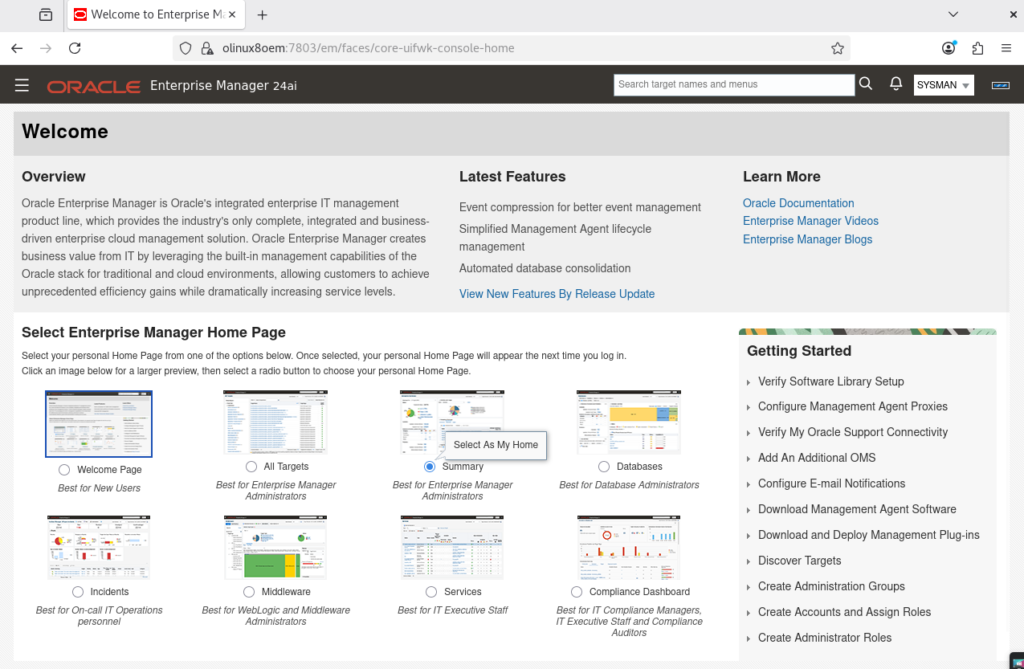
Perfect, you have now Oracle Enterprise Manager up and running, and monitoring… basically nothing, yet!
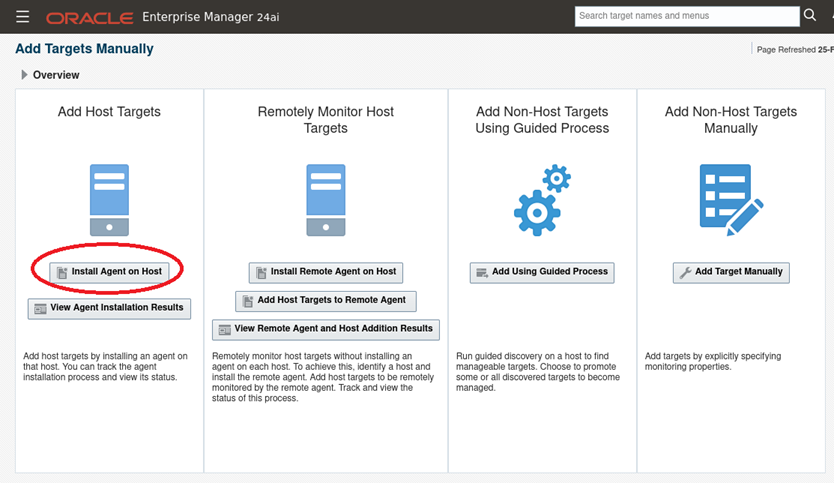
On the old world, you needed to install an agent on each of the server, but on 24ai they introduced another way of going, it is via Remote Agent, on which a single agent on a server and this monitors remote hosts targets. Since this is just a test for my lab, I’m going to do it the old way…
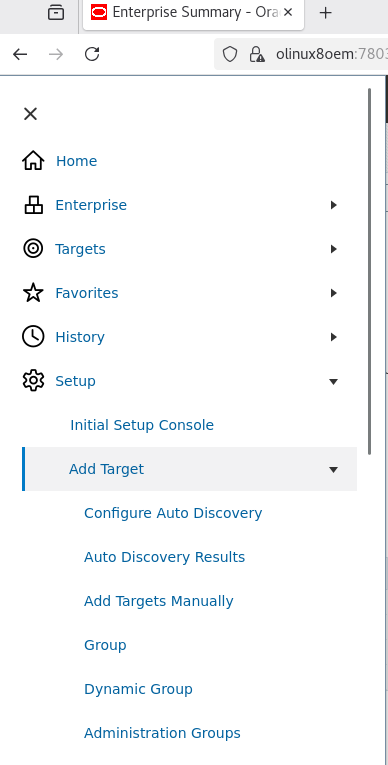
Click the 3 lines on the top left -> Setup -> Add Target -> Add Targets Manually, then Install Agent on Host
Make sure host to monitor is under /etc/hosts, on this case server name is olinux8:
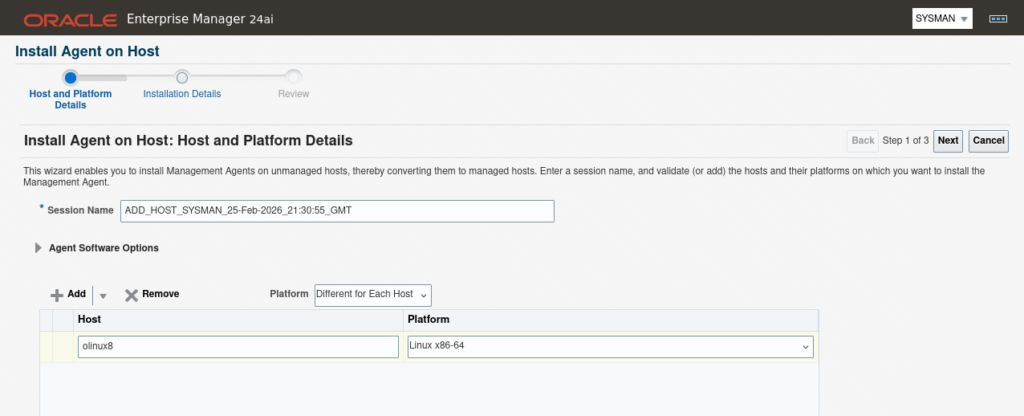
Next.
Fill “Installation Base Directory” and “Instance Directory“:
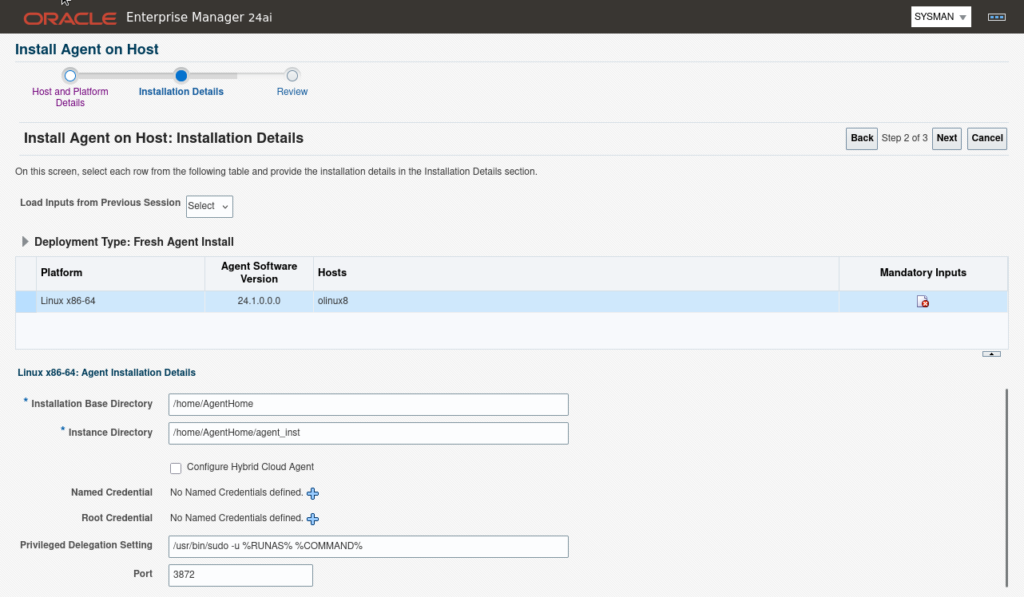
Populate Named Credential and Root Credential:

Next
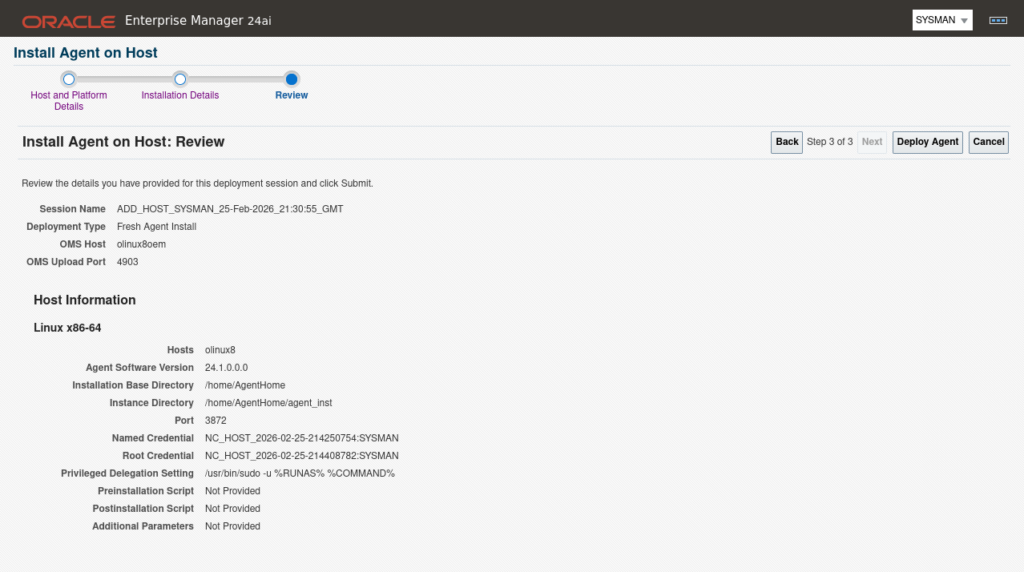
Deploy Agent and wait for deployment….
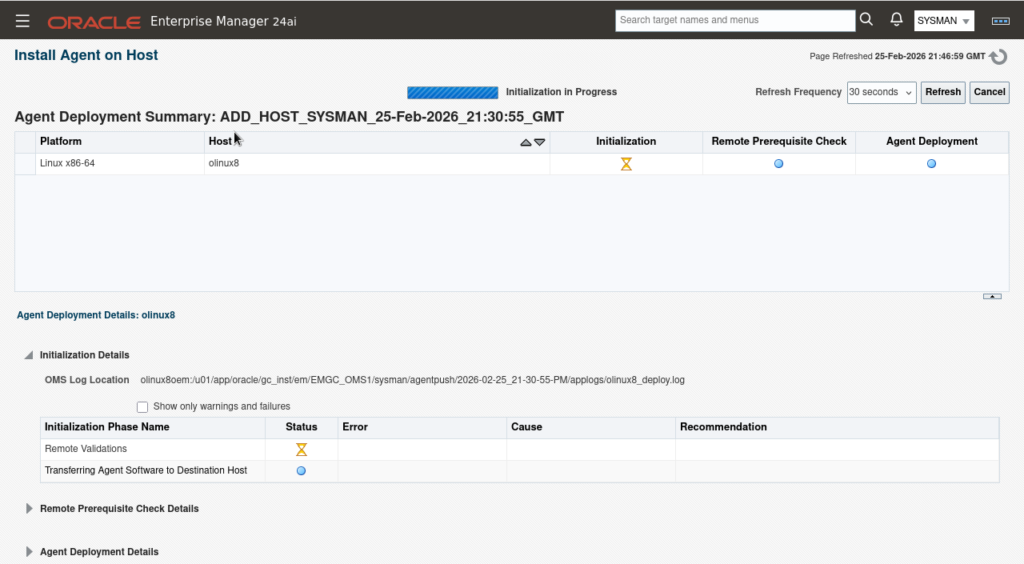
I had to install a few packages on the remote host since prerequisites completed with warnings.
dnf install -y make
dnf install -y binutils
dnf install -y gcc
dnf install -y libaio
dnf install -y libstdc++
dnf install -y sysstat
dnf install -y glibc-devel
dnf install -y glibc-common
dnf install -y libXtst
dnf install -y libnsl
Retry and wait (you might need to cancel and re-try the deployment….)
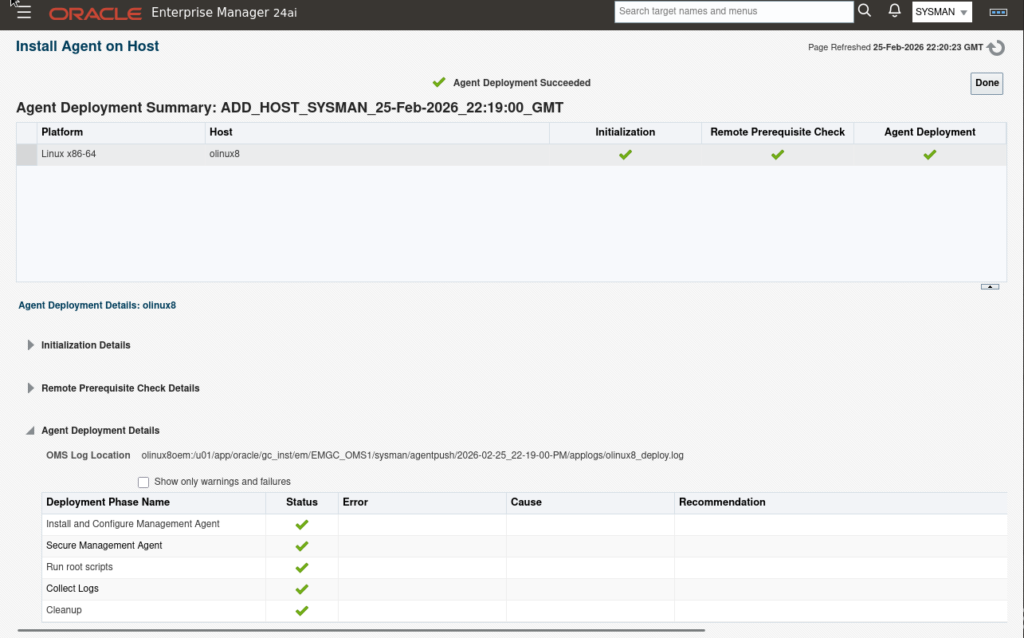
Now, go to Targets -> Hosts:
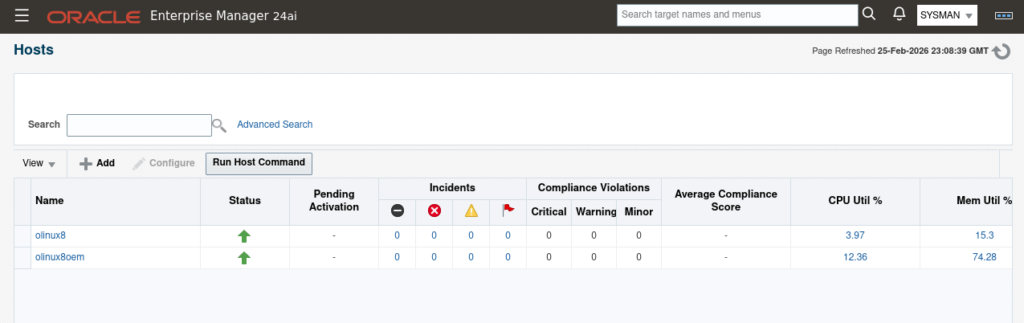
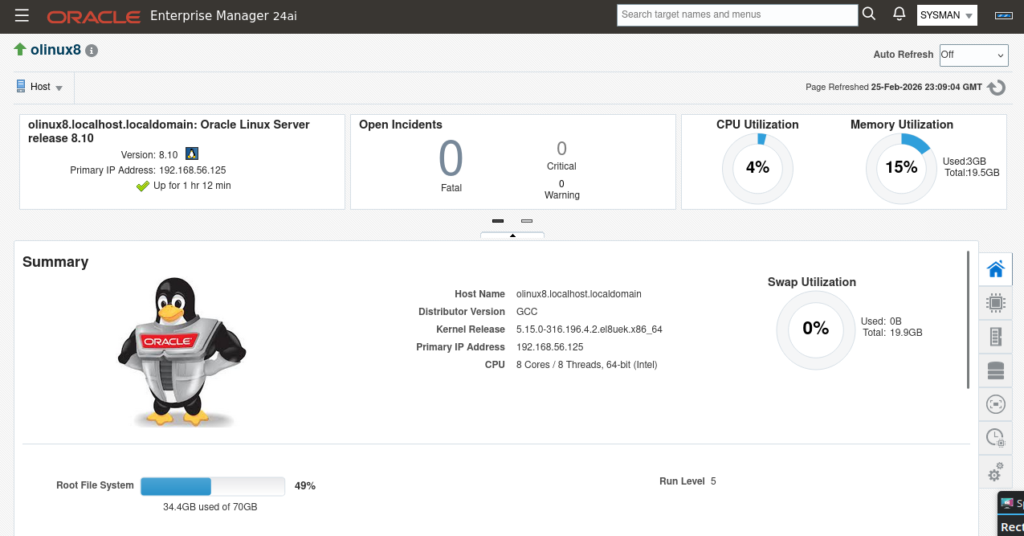
Now, how to bring the DB targets into monitoring? go to Targets -> All Targets. At the bottom there is “Discovered Targets” (click at the number)
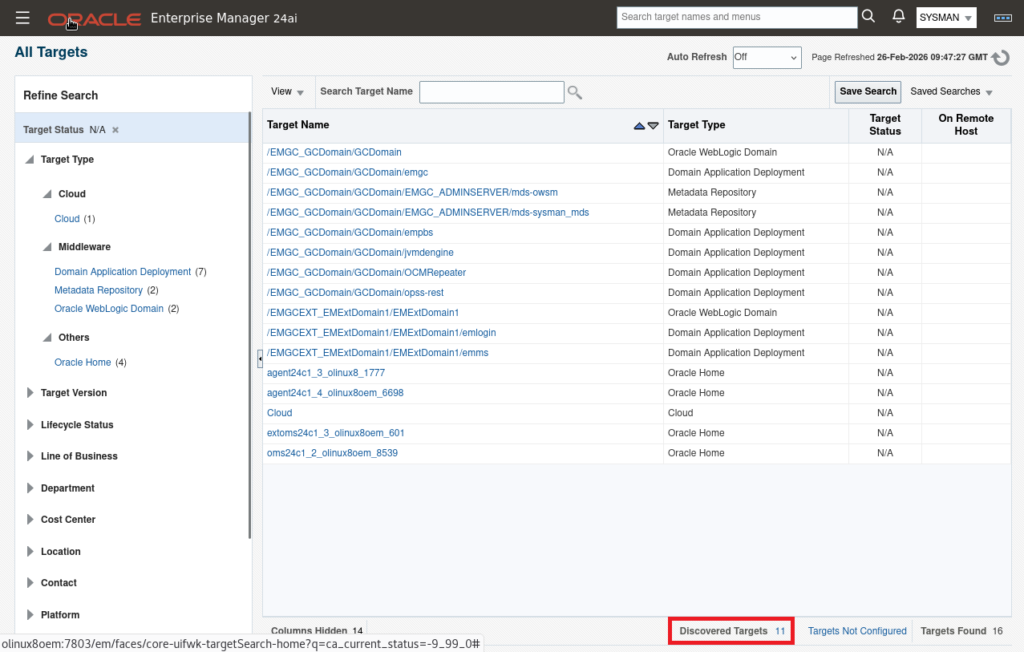
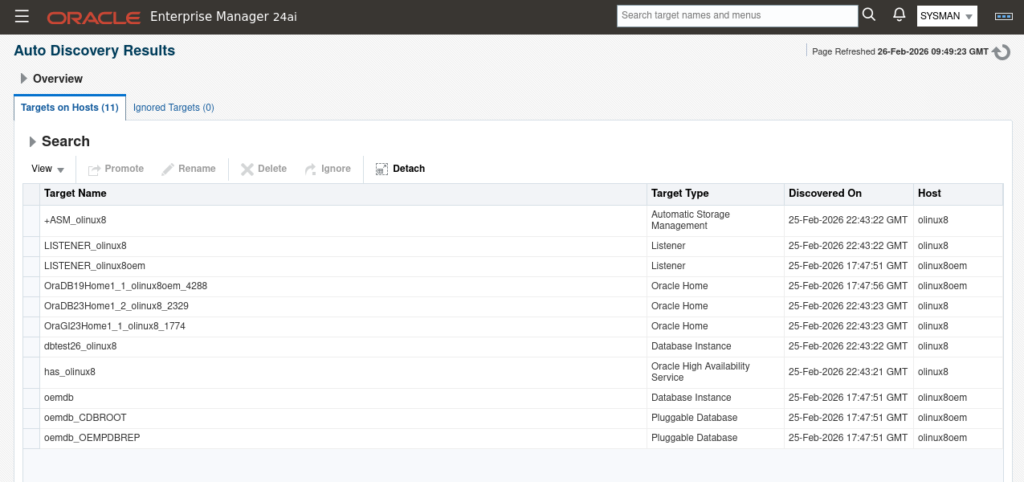
Here we can see the Agent on the host discovered the targets. Select all the targets from the desired Host with the same “Target Type” and Promote. On this case we are only doing the ASM instance, HAS, Listener and DB.
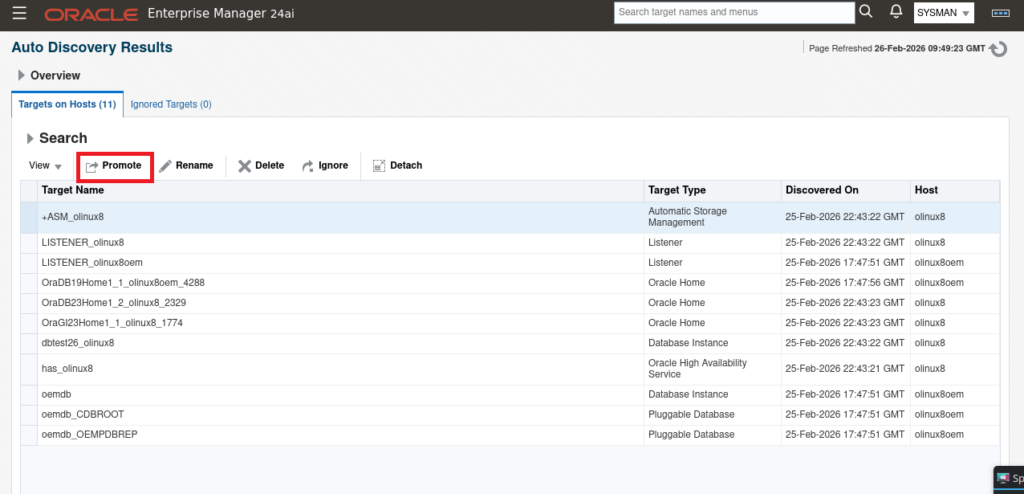
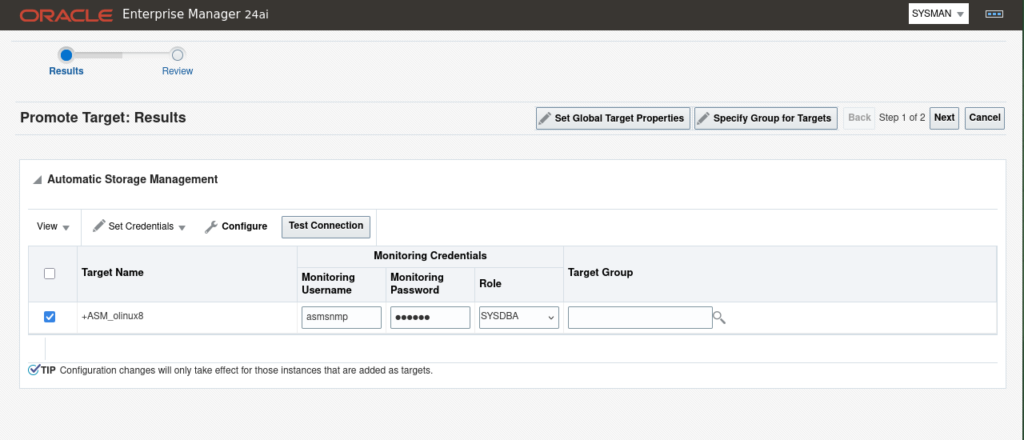
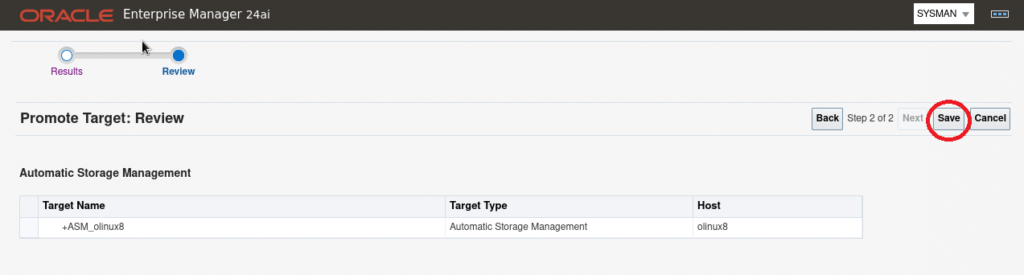
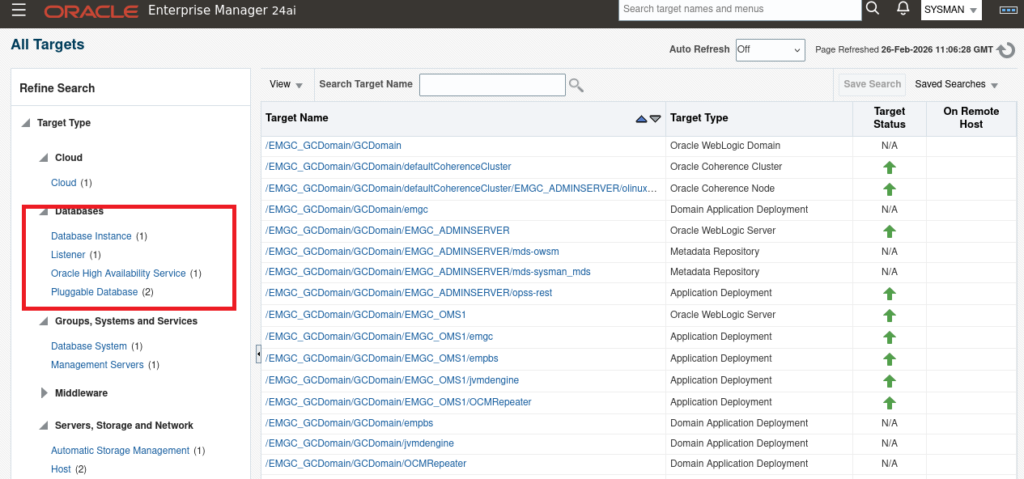
Repeat the same for all target types and when done, go to Targets -> All Targets and select what you want to check:
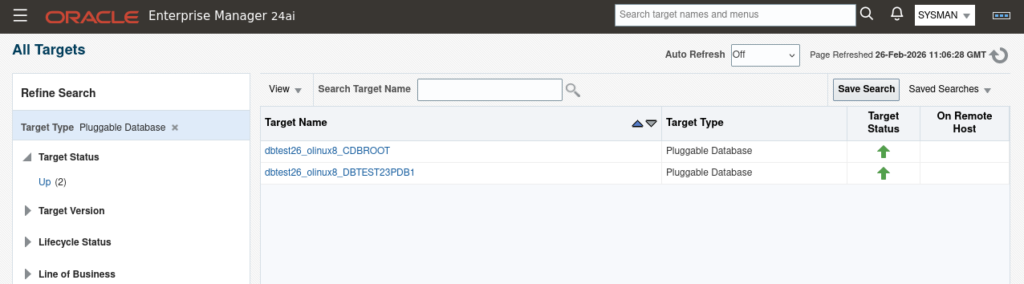
Install and monitoring is all done, but OEM autostartup will fail unless DB is up and running, so let’s do a controlled startup.
Comment out the homes inside this file so no automatic startup is attempted:
[oracle@olinux8oem ~]$ cat /etc/oragchomelist
#/u01/app/oracle/middleware/oms_home
#/u01/app/oracle/agent/agent_24.1.0.0.0:/u01/app/oracle/agent/agent_inst
[oracle@olinux8oem ~]$
Create this startup script:
[oracle@olinux8oem scripts]$ cat /home/oracle/scripts/OEM-full-stack-startup.sh
#!/bin/bash
export ORACLE_HOME=/u01/app/oracle/product/19c/db_home1
export OMS_HOME=/u01/app/oracle/middleware/oms_home
export AGENT_HOME=/u01/app/oracle/agent/agent_inst

echo "Starting DB resources... :"
$ORACLE_HOME/bin/dbstart $ORACLE_HOME

echo "Starting OMS resources... :"
$OMS_HOME/bin/emctl start oms

echo "Starting AGENT resources... :"
$AGENT_HOME/bin/emctl start agent
[oracle@olinux8oem scripts]$
Create this shutdown script:
[oracle@olinux8oem scripts]$ cat /home/oracle/scripts/OEM-full-stack-shutdown.sh
#!/bin/bash
export ORACLE_HOME=/u01/app/oracle/product/19c/db_home1
export OMS_HOME=/u01/app/oracle/middleware/oms_home
export AGENT_HOME=/u01/app/oracle/agent/agent_inst

echo "Stopping OMS resources... :"
$OMS_HOME/bin/emctl stop oms -all

echo "Stopping AGENT resources... :"
$AGENT_HOME/bin/emctl stop agent

echo "Stopping DB resources... :"
$ORACLE_HOME/bin/dbshut $ORACLE_HOME

[oracle@olinux8oem scripts]$
You can add these scripts to the normal startup/shutdown server startup, or run manually.
That’s it! Comparing this vs old versions, this is way easier.
Comments